Clipping Path Source

  • Home
  • Services
    • Clipping Path Service
    • Image Background Removal
    • Image Masking Service
    • Photo Retouching Service
    • Drop Shadow Service
    • Ghost Mannequin Service
    • Raster to Vector
    • Photo Enhancement
    • eCommerce Photo Editing
    • Color changes
    • Multi Clipping Path Services
    • Car photo editing service
    • Image editing services
  • Pricing
  • Blog
  • Contact
    • About Us
  • Quotation
  • Login
FREE TRIAL

VECTOR CONVERSION SERVICES

VECTOR CONVERSION SERVICES

by Robert R. Jones / Monday, 11 February 2019 / Published in Tutorial
Vector conversion, Raster to vector conversion editing service | Clipping Path Source

>> What you’ll learn in this article

Toggle
  • The difference between raster and vector:
  • The uses of vector conversion:
  • Converting vector to raster:
  • Vector conversion services at Clipping Path Source:
  • The file types what we accepted:
  • The file types what you can receive:
    • Good finds? Share them

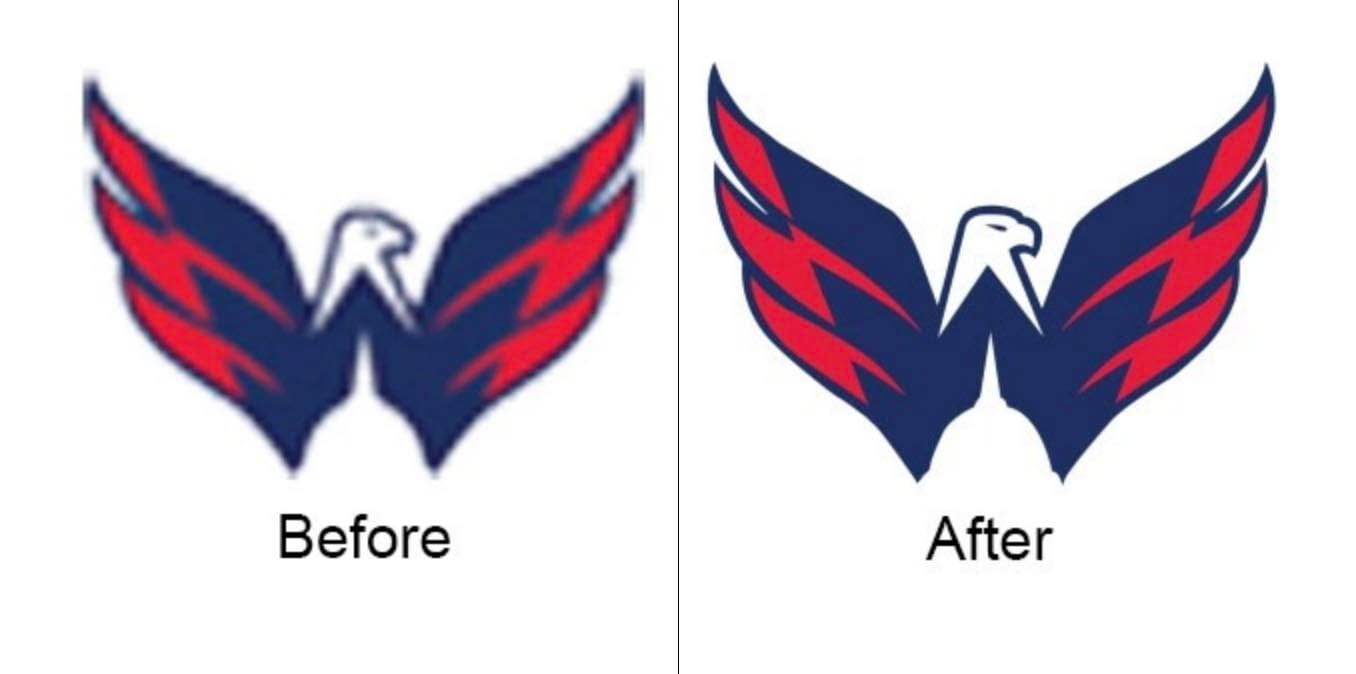
If you have a photo or blurry image that you want to enlarge then vector conversion is ideal for you. Photos, Images, and logos for banners, vehicle wraps, print marketing materials, T-shirt printing, screen printing and more can lose quality when you enlarge them from the original raster file. Here comes the beauty of vector conversion because converting raster to vector preserves the fine details and gives you a big image with crisp, clean lines.

But converting raster files to vector files can be a monotonous and time-consuming task. Outsourcing can free up your precious time at a budget-friendly cost. When we deliver you your vector files, you can use them at any size without losing the quality of the image.

Ready to experience professional photo editing with consistency you can trust?
Try two free edits >

Enlarge your image and slogan for the sign at your next trade show, create vector line art to print your logo, or get clean vectors to screen print your emblem on t-shirts. At Clipping Path Source, we manually draw each vector to make sure every detail is captured which will be helpful to enlarge your business.

VECTOR CONVERSION SERVICES AT CLIPPING PATH SOURCE:

How to Add a Shadow in Photoshop for Product Photos
Learn More

What is vector conversion?

Converting raster to vector is when raster files are manually recreated in vector format. This process can be automated, however, the results of the automated conversion are typically not good. The best way to truly convert a raster to a vector file is to skillfully recreate the original image by hand.

The difference between raster and vector:
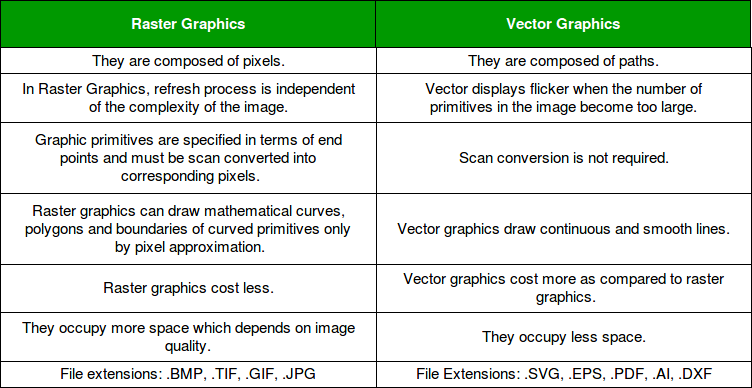
Raster files are basically defined by a series of pixels. These pixels cause the image to lose some detail depending on the quality of the photo or image. However, this is normally only seen when the image is enlarged, making it look pixelated (sort of like an 8-bit video game).

Raster files don’t have every detail, they are normally smaller in size. This smaller size makes them great for use on your website or online store. GIFs, PNGs, and JPEGs are ordinary raster file types.

Vector files are described by a series of points that create straight and/or curved paths. This visual information is more mathematical — a series of points on a graph with an X and a Y-axis. Because they’re not composed of pixels, vectors can be resized to any size without giving up quality — vectors are scalable.

PDF, EPS, SVG, and AI files are common types of vector files. Vector files are great for many printed materials such as business cards, T-shirts, mugs, and banners. Vector files are also a good way to sharpen older, fuzzy graphics. And if you are generating a new graphic or logo, it’ll avoid any distortion or quality loss when enlarging or printing the image.

15 Best Websites to Sell Photos Online in 2025- Maximize Your Earnings
15 Best Websites to Sell Photos Online in 2025: Maximize Your Earnings
Learn More

The uses of vector conversion:

  • If you want to convert a real photograph or hand-drawn image into a graphic.
  • It will reduce your printing costs by reducing the number of color plates the printer needs to print your images.
  • You are creating a sign to promote your business and need to print custom graphics.
  • For engraving, you need to provide vector line art.

Converting vector to raster:

As if vector images have more detail, it’s much easier to convert them to raster files. What you need to do is use the Save As function to change the file type of the image.

Vector conversion services at Clipping Path Source:

Anyway, where you’re located it doesn’t matter, we have a sales and support team that works 24/7 to serve our international clientele. If a client deadline is looming, a business launch is around the corner, or another pressing timeline hits your desk and you can’t make a decision on what to do then Clipping Path Source is an efficient vector conversion solution for you.

The file types what we accepted:

  • .jpg
  • .png
  • .gif
  • .pdf
  • .psd

The file types what you can receive:

  • .eps
  • .ai
  • .svg
  • .pdf

You may upload files of any size up to 100GB through our customer portal. When your files are ready, you can download them directly from our customer portal as well.

Suggested article >>

Choosing Between Raster Or Vector Image

Best Alternative to Lightroom
The Best Alternatives to Adobe Lightroom: Smart Options
Learn More

Let us take care of your image editing—so your time stays where it matters. Start free.
Learn more
photoshop pen tool for clipping path service
Let our experts handle your background removal with crisp, hand-made clipping paths—so you can focus on what matters most.
Start free now

Good finds? Share them

COPY URL
Copied!
Tagged under: VECTOR CONVERSION

About Robert R. Jones

Hi, this is Robert R. Jones. I am an Australia-based professional article writer and freelancer. I am one of the most senior writers working for several years for customers around the world. I usually loves to play piano, and guitar and also loves to train dogs.

What you can read next

Basic Color Correction (White/Grey Balance) In Photoshop
Using Layers In Photoshop – A Comprehensive Beginners’ Tutorial
How To Remove Background From Hair In Photoshop CC18

Get our weekly insights and tips

Subscribed for the newsletter

Recent Posts

  • How to Add a Shadow in Photoshop for Product Photos

    How to Add a Shadow in Photoshop for Product Photos

    0 comments
  • What Is Photo Editing? A Complete Professional Guide to Modern Photo Editing

    What Is Photo Editing? A Complete Professional Guide to Modern Photo Editing

    0 comments
  • Why Top Brands Still Rely on Manual Clipping Path

    Why Top Brands Still Rely on Manual Clipping Path

    0 comments
  • Human-AI Collaboration in Photo Editing: Where Automation Ends and Expertise Begins

    Human-AI Collaboration in Photo Editing: Where Automation Ends and Expertise Begins

    0 comments
  • Photoshop Clipping Path Service

    Photoshop Clipping Path Service: The Ultimate Professional Guide for E-commerce, Photography, and Digital Marketing

    0 comments

Categories

  • Article
  • Clipping path
  • Clipping Path Source
  • Ecommerce business
  • Erase tool
  • Graphic designer
  • Image Editing Service
  • Photo retouching
  • Photographer and Photography
  • Product Photography
  • Raster to vector conversion
  • Review
  • Sports Photography
  • Tips and tricks
  • Tutorial
  • Website image optimization

Services

  • Clipping path service provider at affordable price.
  • Image shading
  • Photoshop masking
  • Photo retouching
  • Raster to vector
  • Mannequin removing
  • Photo enhancement
  • Image stitching
  • eCommerce product images editing

About us
Gallery
Blog
Privacy policy
Term and conditions
Request an FTP Access
Glossary

Contact us
FAQ
Services
Partnership
Refund policy
Sitemap
Testimonials

Recent posts

  • How to Add a Shadow in Photoshop for Product Photos

    How to Add a Shadow in Photoshop for Product Photos

    Elevating how to add shadow in Photoshop for pr...
  • What Is Photo Editing? A Complete Professional Guide to Modern Photo Editing

    What Is Photo Editing? A Complete Professional Guide to Modern Photo Editing

    Photo editing is one of the most important part...

Headquarter


2360 Stony Brook Dr Louisville KY 40220.
Phone: USA: +1 (929) 226-9462
Mail: [email protected]
Web: www.clippingpathsource.com

DMCA.com Protection Status   FRANÇAIS | ITALY | N. LANDS | GERMANY

  • GET SOCIAL

© 2026. All rights reserved Clipping Path Source.

TOP
  • USD $ USA Dollar
  • EUR € Europian Euro
WhatsApp us